OBD Fusion (Car Diagnostics)
OCTech, LLCCommunication
4.6561.00 Reviews
- Version
- 7.4.0
- Installs
- 100.00K
- Age Rating
- Everyone
Screenshots
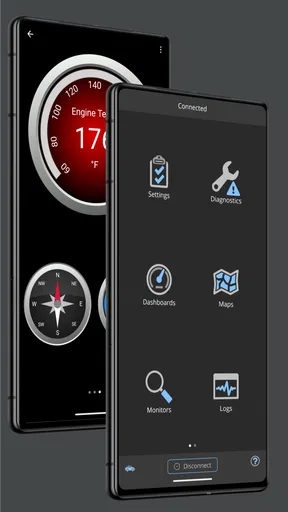
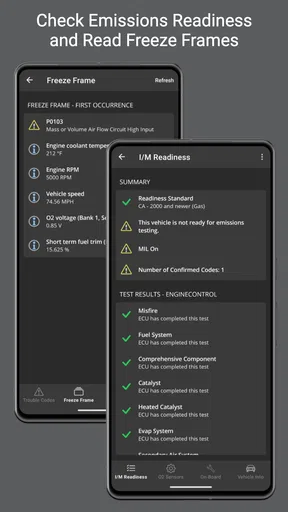
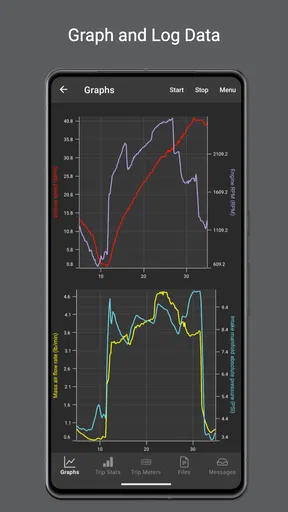
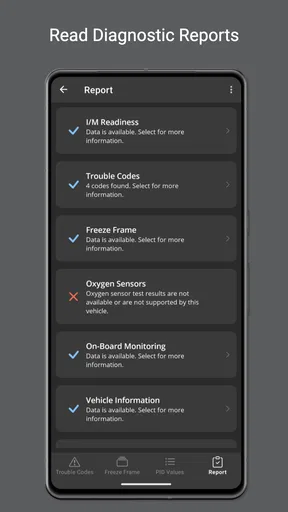
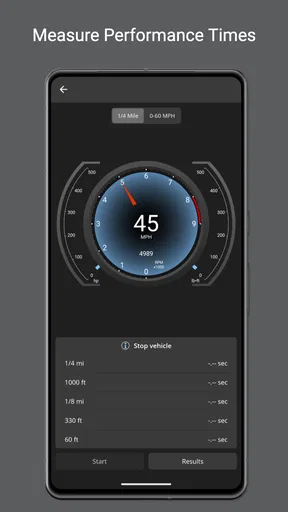
Our Review of OBD Fusion (Car Diagnostics)
 Analysis by Appyee
I like car apps that solve a specific problem instead of pretending to replace an entire workshop. OBD Fusion, from OCTech, LLC, takes that focused approach: it is a communication app for reading OBD2 information and diagnostic trouble codes, then presenting the results in dashboards that you can shape around your vehicle. After spending time with it, I see it as a serious tool for drivers who want more visibility into what their car is doing, not as a magic button that diagnoses every mechanical issue.
The appeal is easy to understand. A warning light can turn an ordinary drive into a guessing game, while a basic dashboard can leave useful information hidden behind a single number. This app gives you a way to inspect vehicle data, watch selected readings, and approach a repair conversation with more context. Its real value is turning raw car information into something a careful owner can monitor and discuss.
What OBD Fusion actually offers for everyday diagnostics
The app sits in the communication category, but its purpose is much more specialized than messaging or calling. It connects your phone to vehicle diagnostic information through compatible OBD2 equipment and lets you work with readings from the car. The central workflow is straightforward: connect, read the available information, arrange the values you care about, and use diagnostic trouble codes as a starting point for investigation.
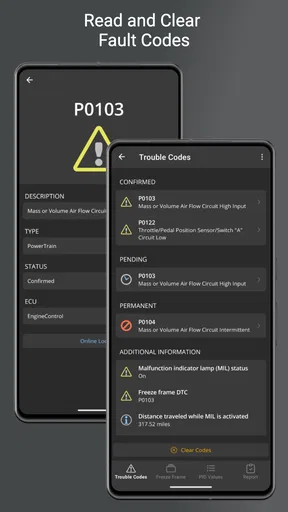
That last part matters. A trouble code is not automatically a complete repair instruction. It points toward a system or condition that deserves attention, but a competent diagnosis still depends on the vehicle, the symptoms, the code context, and sometimes additional testing. I found the app most useful when I treated it as an information layer between the car and me, rather than as a substitute for mechanical judgment.
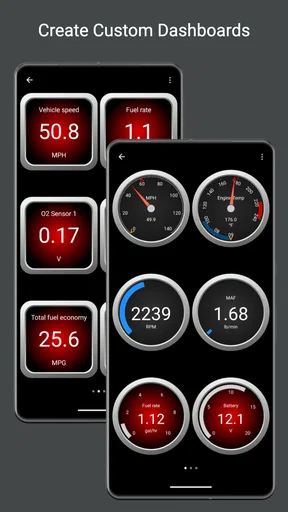
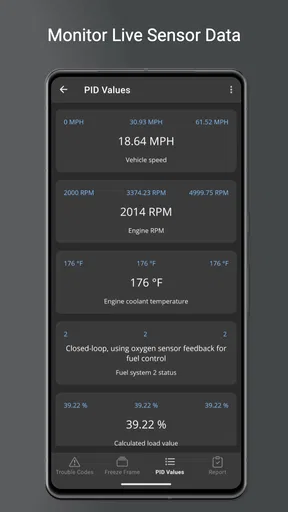
The custom dashboard idea is one of the strongest parts of the experience. Instead of opening the app only when a warning appears, you can organize the readings that make sense for your own driving habits. One driver may care about temperatures and engine-related readings, while another may want a compact view for checking changes during a long trip. The benefit is not simply seeing more data; it is reducing the effort needed to find the data that matters.
Enhanced diagnostics are also available, which gives the app more ambition than a minimal code reader. That makes it potentially useful for people who have already outgrown a simple handheld scanner or a very basic phone utility. At the same time, the word “enhanced” should not lead you to expect that every vehicle exposes the same information. What you can read depends on the car and the diagnostic connection, so the app’s usefulness can vary from one vehicle to another.
Cost is clear, but the total setup deserves attention
The app has a listed price of $5.99, and it also includes in-app purchases ranging from $14.99 to $74.99 per item. This means the initial purchase is not the only cost a prospective user should consider. The app itself is paid rather than presented as a free download with a purely optional upgrade path, while additional purchases may matter depending on which capabilities you want.
There is another practical cost outside the app: you need a suitable way for the phone to communicate with the vehicle. The software cannot read the car by itself. If you already own compatible OBD2 hardware, the purchase is easier to evaluate because you can focus on what the app adds. If you do not, the complete setup will require more planning and spending than the app price alone suggests.
I appreciate that the purchase is easier to justify for a driver who will use the tool repeatedly. A single visit to a repair shop may still be the better financial choice when the issue is urgent or complicated. But for someone who wants to monitor a car over time, inspect codes before deciding what to do, or keep a closer eye on selected readings, a paid diagnostic app can make more sense than repeatedly buying the cheapest one-off scan.
The important distinction is between paying for access and paying for certainty. OBD Fusion can give you more information, but it cannot guarantee that the information will identify the failed part without further testing. I would not buy it expecting to eliminate mechanic visits. I would buy it to arrive at those visits better informed, or to handle straightforward monitoring with less guesswork.
Where the value appears in real use
Imagine that the check-engine light comes on during a normal week. With no diagnostic tool, your choices may be to search vague symptoms online, visit a shop immediately, or continue driving while worrying about the warning. With this app and a compatible connection already prepared, you can read the available trouble code and record what the car is reporting before making the next decision.
That does not tell you to ignore the warning. It gives you a more useful first question: is this an issue that appears consistent with the car’s symptoms, and does it require immediate professional attention? If the vehicle is running badly, overheating, losing power, or showing other serious signs, the code reader should not become an excuse to keep driving. The app is most valuable when it supports sensible decisions rather than replacing them.
A second use case is preventive observation. A custom dashboard can help you notice changes in readings that might otherwise be invisible during ordinary driving. The key is to compare patterns under similar conditions instead of reacting to every fluctuation. A number changing during startup, traffic, hills, or hot weather may mean something different from the same number changing steadily under comparable conditions.
This is where I found a less obvious strength: the dashboard can encourage disciplined observation. Rather than opening a screen full of unrelated values, you can create a view for a particular purpose, such as a trip check or a symptom investigation. That makes the app more useful as a monitoring notebook, even though it is not a replacement for formal service records or professional measurement equipment.
Another useful workflow is preparing for a repair conversation. Before calling a shop, I would note the exact code, when the warning appeared, how the car behaved, and whether the condition returned after clearing or restarting. I would be careful about clearing codes simply to make the warning disappear, because that can remove useful diagnostic context. Reading first and documenting the situation is the safer habit.
Custom dashboards are helpful only when you keep them purposeful
Customization can easily become clutter. The temptation is to place every available reading on one screen, but that often makes the dashboard harder to interpret while driving or troubleshooting. I prefer a small group of values tied to one question. If I am investigating a temperature concern, I want a focused view rather than a wall of unrelated gauges.
This also creates a trade-off between convenience and interpretation. A polished gauge can make a value feel authoritative, but the display does not remove the need to understand what the value represents. A reading can be normal in one situation and concerning in another. I would use the dashboard to spot changes and support questions, not to make a mechanical conclusion from one isolated number.
For a technically minded owner, this flexibility is a genuine advantage over a cheap scanner that only returns a code and a short label. For a casual driver, it may feel like extra work. The app rewards users who are willing to learn what their vehicle’s readings mean and who can resist turning every available value into a source of anxiety.
Enhanced diagnostics bring more depth, with important limits
The enhanced diagnostic option gives the app room to serve users who want more than basic trouble-code access. That can be valuable when a simple reader feels too shallow, especially if you are tracking a recurring problem or trying to understand the relationship between a warning and live vehicle behavior.
Still, diagnostic depth is not the same as universal coverage. Different vehicles expose different information, and the app cannot create data that the car does not provide through its diagnostic system. I would check compatibility carefully before buying additional capabilities, particularly if the main reason for purchase is one specific reading or a specialized diagnostic task.
This is also why I would avoid judging the app solely by how many screens or values it can show. The better question is whether it can show the information relevant to your vehicle and your problem. A smaller set of dependable readings is more useful than an impressive-looking collection that does not apply to your car.
What feels less convenient than a basic scanner
The first friction is setup. A dedicated handheld scanner is often quicker for someone who just wants to retrieve a code in a driveway. With a phone-based system, you have to manage the connection, keep the phone available, and make sure the hardware and vehicle work together. That extra flexibility is worthwhile for some people, but it is not automatically simpler.
The second friction is interpretation. A basic scanner may be limited, but its narrow purpose can be reassuring. OBD Fusion gives you more room to explore, which also means more opportunities to misunderstand a value or assume that a code identifies a failed component. New users should treat the app as a guide to the next diagnostic step, not as a final verdict.
The paid model can also be a barrier for occasional users. Someone who only wants to check one warning light once may prefer borrowing a scanner, visiting a parts shop, or paying for a professional scan. Those alternatives can be better when convenience matters more than ongoing access. The app makes more sense when you expect several uses over the life of a vehicle.
There is a practical safety limitation too: a phone display is not a sensible distraction while driving. I would configure the dashboard before setting off and avoid interacting with it on the road. For troubleshooting, pull over safely. The app can support observation during a trip, but it should not encourage drivers to watch gauges constantly or operate the phone in moving traffic.
Who will get the most from the purchase
I would recommend it to owners who enjoy understanding their vehicles, people maintaining an older car, and drivers who want a reusable diagnostic tool rather than a one-time scan. It is also a good fit for someone who has already used a basic reader and now wants custom dashboards or deeper access to available vehicle information.
It can be especially useful for a household with more than one compatible vehicle, because the same app can become part of a repeatable checking routine. Before a long journey, you might inspect for stored codes and set up a focused dashboard. After a warning appears, you can capture information before arranging service. That repeated workflow is where the paid price becomes easier to defend.
DIY owners may appreciate the ability to compare symptoms with readings and arrive at a repair decision with better context. Even when the eventual fix requires a professional, having the code and the circumstances written down can make the conversation more efficient. Just remember that responsible DIY diagnosis includes knowing when the evidence is inconclusive.
I would skip it if you want a completely automatic answer to “what part should I replace?” I would also skip it if you dislike connecting accessories, learning diagnostic terms, or interpreting readings. A professional inspection or a simpler scanner is a better match for those needs. The app is not aimed at removing all complexity; it gives motivated users more information to work with.
How it compares with the usual alternatives
Compared with a basic handheld OBD2 reader, OBD Fusion offers a more flexible phone-based experience. The custom dashboard approach is more suitable for ongoing observation than a device designed mainly to display a code. The trade-off is that the phone setup may require more preparation, and the greater amount of information demands more judgment.
Compared with a repair shop’s diagnostic equipment, the app is more accessible for routine owner-level checks but is not a substitute for professional tools, testing, or experience. A shop can combine scan results with physical inspection and manufacturer-specific procedures. I see this app as a way to decide how urgently to seek that expertise and to communicate more clearly once you do.
Compared with generic car-monitoring apps, its focus is a strength. It is built around OBD2 data, codes, dashboards, and diagnostics rather than trying to be a broad driving companion. That narrow purpose makes it more appealing to someone with a real diagnostic reason, but less appealing to a driver looking for navigation, fuel planning, insurance tools, or social features in the same package.
Compatibility, age rating, and the ownership decision
The listed minimum operating system is version 7.0, and the content rating is Everyone. Those details make the app broadly approachable from an age perspective, but they do not answer the more important vehicle question by themselves. Before spending money, I would confirm that your car, phone, and OBD2 adapter can work together for the readings you actually want.
The current version is 7.4.0, while the app was released on Jun 7, 2012. That long presence suggests a product with a substantial history rather than a brand-new experiment, but longevity alone should not be treated as proof that every vehicle-specific need is covered. I would still test the connection as soon as possible and avoid waiting until an emergency warning appears.
Its average rating is 4.6 from around 3.2 thousand ratings, with around 561 written reviews, and it has more than 100 thousand installs. Those figures indicate that the app has attracted a meaningful user base and generally positive reception. I would read that as encouraging, not as a guarantee of identical results across vehicles, adapters, and skill levels.
My final view is favorable, with a clear condition: buy OBD Fusion when you want a reusable window into your car, not a one-tap mechanical diagnosis. The $5.99 price is reasonable for a focused tool if you already have compatible hardware and expect to use custom dashboards, code reading, or enhanced diagnostics more than once. The additional in-app purchase range makes it important to decide which depth you genuinely need before spending further.
For an occasional warning-light check, a simpler or professional alternative may be more convenient. For an engaged owner who wants to monitor a vehicle, prepare better questions for a mechanic, and move beyond the limitations of a basic code reader, this app delivers meaningful value. I would recommend it to that second group, provided they are comfortable treating its readings as evidence for diagnosis rather than the diagnosis itself.
Verdict
Strengths of OBD Fusion (Car Diagnostics)
- Reads and clears trouble codes from many OBD-II vehicles.
- Offers customizable dashboards for monitoring live engine data.
- Supports trip logging with GPS routes and vehicle statistics.
- Can create detailed diagnostic reports for sharing or saving.
- Works with several Bluetooth and Wi-Fi OBD adapters.
Limitations of OBD Fusion (Car Diagnostics)
- Some advanced features require additional in-app purchases.
- Compatibility varies by vehicle, adapter, and manufacturer protocols.
- Initial setup may be confusing for users unfamiliar with OBD scanners.
- Continuous GPS and Bluetooth use can noticeably reduce battery life.
- Not all vehicle modules or manufacturer-specific systems are supported.
Similar Picks in This Category
View All
Google Messages
Google LLC4.6

Gmail
Google LLC4.1

Google Meet
Google LLC4.4

Google Chrome
Google LLC4.1

WhatsApp Messenger
WhatsApp LLC4.6

Carrier Services
Google LLC4.2
Frequently Asked Questions
What is OBD Fusion, and what can it do?
OBD Fusion is a vehicle diagnostics app that connects to a compatible OBD-II adapter, allowing you to view live engine data, read and clear diagnostic trouble codes, and monitor important vehicle parameters. Depending on your car and adapter, it can display sensor readings, create customizable dashboards, record trips, and provide additional information such as fuel economy or emissions-related data.
What hardware is required to use OBD Fusion?
You cannot use OBD Fusion by itself because the app needs an OBD-II adapter connected to your vehicle’s diagnostic port. The adapter must be compatible with your phone and operating system, such as Bluetooth, Wi-Fi, or another supported connection type. Compatibility can also vary by vehicle, so checking the app’s supported adapters and car requirements before purchasing hardware is recommended.
Is OBD Fusion compatible with every car?
OBD Fusion works with many vehicles that support the standard OBD-II or EOBD diagnostic protocols, particularly cars sold in regions where these standards are required. However, compatibility is not identical across all makes, models, and years. Some manufacturer-specific functions may be unavailable, and older vehicles may require a particular adapter or may not support every feature offered by the app.
Can OBD Fusion diagnose problems and clear the check-engine light?
The app can read diagnostic trouble codes from compatible vehicles and, in many cases, clear those codes and reset the check-engine light. Clearing a code does not repair the underlying problem, however. The warning may return if the fault remains, and resetting codes can erase useful diagnostic information or reset emissions monitors. Serious or unclear problems should still be inspected by a qualified mechanic.
Does OBD Fusion require an internet connection or subscription?
Basic communication between OBD Fusion and your vehicle generally takes place through the connected OBD-II adapter, so an internet connection is not always necessary for everyday use. Some optional features, map-related functions, updates, or additional vehicle databases may require connectivity or separate purchases, depending on the platform and version. Review the current store listing for pricing, in-app purchases, and feature limitations.
